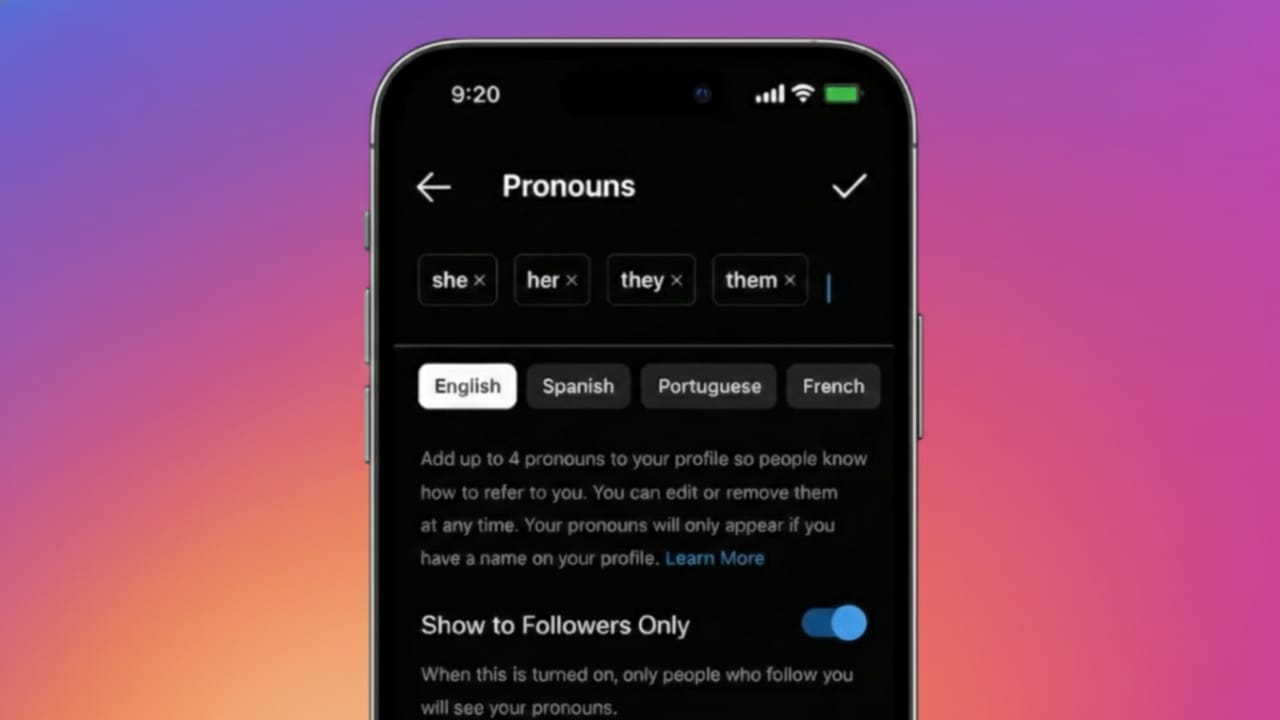
Instagram gives users the option to add pronouns to their profiles, making it easier for others to address them correctly. This feature is completely optional and focuses on personal comfort, clarity, and respectful interaction.
If you’re wondering how to add pronouns to your Instagram profile, adjust their visibility, or remove them later, this guide walks you through everything in a clear and beginner-friendly way—using only Instagram’s official settings.
Also read: How to Create and Use Saved Replies on Instagram to Reply Faster
What Are Pronouns on Instagram?
Pronouns on Instagram are short identifiers such as she/her, he/him, they/them, or other available options. When added, they appear just below your name on your profile.
This feature was introduced to give users more control over how they are addressed, without making it mandatory. You can choose whether or not to use pronouns at all.
Who Can Use the Pronouns Feature on Instagram?
Instagram has rolled out pronouns in many regions, but availability may vary depending on location and account type.
Here’s what you should know:
- The feature works on both Android and iPhone
- You must be using the latest version of the Instagram app
- Some accounts may receive the feature later due to phased rollouts
If the option appears in your profile settings, you’re good to go.
How to Add Pronouns to Your Instagram Profile
Adding pronouns takes only a few taps. Follow these steps carefully:
- Open the Instagram app on your phone
- Go to your profile page
- Tap Edit Profile
- Select the Pronouns option
- Search for and choose up to four pronouns
- Set who can view them
- Tap Done to save
Once saved, your selected pronouns will appear under your name on your profile.
How to Change or Remove Pronouns on Instagram
To Change Your Pronouns
If your preferences change, you can update them anytime:
- Open Edit Profile
- Tap Pronouns
- Remove the current selection
- Choose new pronouns
- Save the changes
To Remove Pronouns Completely
If you no longer want pronouns displayed:
- Go to Edit Profile
- Open Pronouns
- Remove all selected pronouns
- Tap Done
Your profile will return to its previous appearance without pronouns.
Who Can See Your Pronouns?
Instagram allows you to control visibility for better privacy. You can choose between:
- Everyone
- Only your followers
This ensures you can use the feature in a way that feels comfortable and secure.
Why Some People Choose to Add Pronouns
Adding pronouns is a personal decision. Users choose to enable this feature for various reasons, such as:
- Making communication clearer
- Reducing misunderstandings
- Expressing identity comfortably
- Encouraging respectful interactions
There’s no requirement to add pronouns—your account functions the same either way.
What If You Don’t See the Pronouns Option?
If the pronouns setting isn’t visible on your account, try the following:
- Update Instagram to the latest version
- Log out and log back in
- Check whether the feature is available in your country
- Wait for Instagram’s gradual rollout
New features are often released in stages, so access may take time.
Also read: How to Find the Email Linked to Your Instagram Account (Step-by-Step Guide)
FAQs
Can I add custom pronouns on Instagram?
Instagram provides a predefined list of pronouns. Custom entries may not be available in all regions.
Can I hide pronouns from non-followers?
Yes, Instagram allows you to limit visibility to followers only.
Does adding pronouns affect my account reach or algorithm?
No. Pronouns do not impact visibility, reach, or account performance.
Conclusion
Adding pronouns to your Instagram profile is a simple, optional feature designed to support clarity and respectful communication. You can add, change, or remove them at any time, and you stay in full control of who sees them.
If the feature is available on your account and feels right for you, it takes just a few taps to enable. If not, Instagram works perfectly fine without it—no pressure, no impact.

Yogi Rajput is the author of Uscart.in, where he writes simple and helpful content about AI and how-to guides for beginners.